One Plus 5 is certainly on the trending lists on the world of smartphones. Although it had received mixed reviews from the public, still it is the best phone when it comes to performance. While most of the phone’s features were unveiled on stage, there are still some important features that are really useful but are unknown. So, In this article, I will go through with 10 Unknown features of One Plus 5.

Here are the 10 unknown features of One Plus 5
1. Multiple vibration patterns
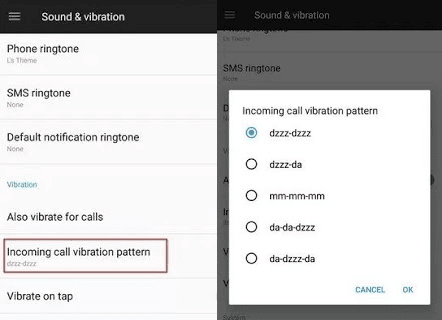
During the launch event of One Plus 5, they just mentioned about the vibration patterns. Their vibration mode was greatly improved lately, with a much sharper and quieter one.
Also, they gave their users a list of various vibration patterns to choose from.
To choose the best-suited vibration pattern, go to:
Settings -> Sound & Vibration -> Incoming call vibration pattern
Here you will see a list of vibration patterns. The list contains the following patterns.
2. Reading Mode
- Go to Settings -> Display -> Reading Mode


- You can manually activate Reading Mode by tapping on the slider against Turn on Reading Mode. Now your device will automatically change its theme to Grayscale.
But that’s not all, you have an option to turn on Reading Mode automatically when certain apps are opened.
To do this, just tap on Add apps for Reading Mode. A list of installed apps will be shown. You can manually select those apps which you need the Reading mode to be turned on. This is a really handy feature if you like reading on your phone.
3. Gaming Mode

To turn on Gaming Mode go to Settings -> Advanced -> Gaming Do Not Disturb.
Here you can select desired apps for which Gaming Mode should be turned on or you can turn on this mode automatically, similar to Reading Mode.
4. Choose Bluetooth Audio Codec

5.Recent App Management

- Normal Clear: Removes the cache of an app.
- Deep Clear: Removes the cache and kills the background process of the app.
6. OnePlus Laboratory

7. Activate Gesture

8. FileDash
However, in One Plus 5, in addition to the WiFi direct, there is a feature called FileDash inside the File Manager.
To use this open File Manager, then tap on the FileDash icon (next to the search icon). then you can select whether you want to send or receive a file.
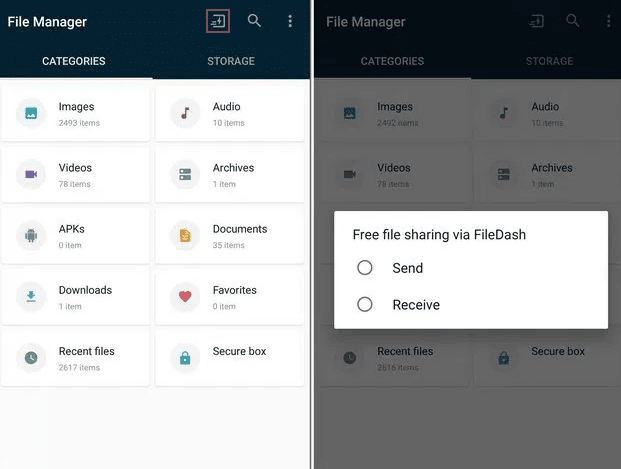
When you send a file your device’s hotspot is turned on to which the receiving device should be connected. If the receiver is using a One Plus device, he can open FileDash and tap on receive.
If the receiver is using some other device, they can receive the file by opening any browser and going to “one.plus” and the file will be received.
9. Secure Box
Today there are many third-party apps available for hiding a file from the file manager. But it is not an easy task to find the best app that suits our needs. But the File Manager in One Plus devices provides a feature called Secure Box.
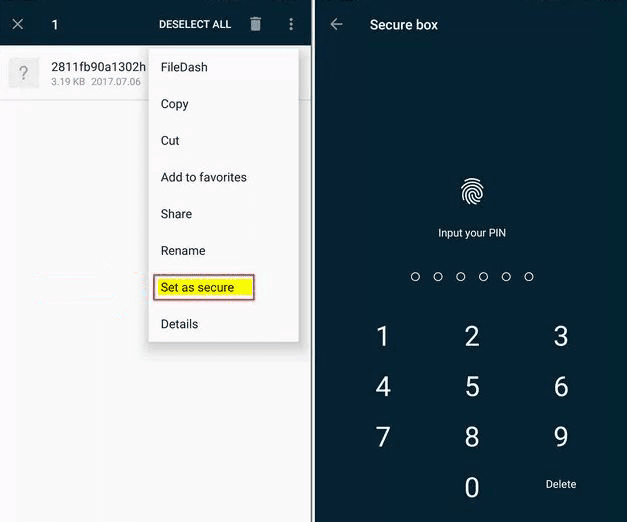
It hides your data from any file explorer and can only be accessed with a password.
To use this feature, just open File Manager and long press on the file that you want to hide, then tap on the 3 – dated menu, then select “Set as Secure”.
To access this file later, open the File Manager, select Secure Box and enter the password.
10.The Inbuilt App Locker
Most of the people use third party app lockers to prevent unauthorized access to desired apps. But these apps take up additional space and most of them contain Ads.
Noticing the demand for these apps, One Plus started including an inbuilt app locker in their devices.
As, a built-in feature, it is much more secure and reliable.
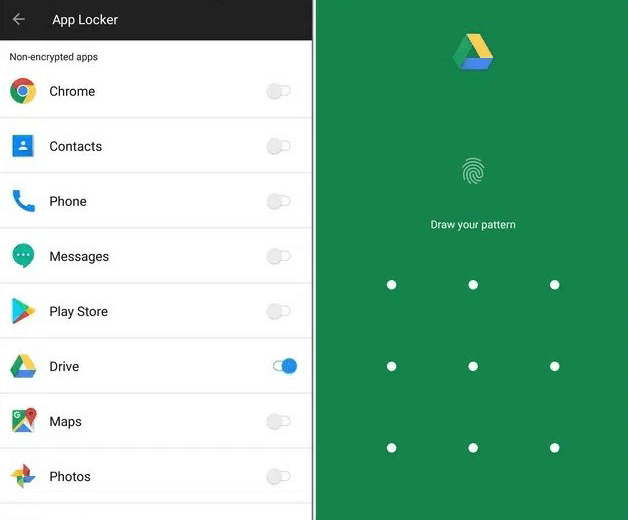
You can utilize this feature by going to Settings -> Security & fingerprint -> App locker.
You will see a list of apps, you can toggle the button next to the app that you want to be locked. Now the next time you open the app, you will have to enter the password.
Conclusion
So these are some Unknown features of One Plus 5 which I found to be really interesting. One Plus 5 stands out to be one among the fastest smartphones and with these cool features it is unbeatable. If you know any cool or unknown feature of One Plus 5 then you can write in the comment section below. If you like it then follow us on Facebook, Twitter, and Google Plus. Share it with your friends on Social Media. Also, Subscribe to our newsletter so that you will receive the latest updates directly in your inbox.