
Diwali AI Photo Editing Prompts. Diwali is the festival of lights, joy, and togetherness, and what better way to celebrate it than by capturing those moments in stunning AI-generated photos? Whether you’re an Instagram influencer, a professional editor, or someone looking to create beautiful Diwali memories, AI tools can help you generate eye-catching images with minimal effort. In this article, we’ll explore how you can use AI-powered platforms to create vibrant, high-quality Diwali-themed photos and artwork.
What is AI Photo Editing?
AI photo editing involves using artificial intelligence tools to automate and enhance the image creation and editing process. With AI platforms like DALL·E, MidJourney, and Bing Image Creator, you can now generate personalized, realistic, and high-quality images based on simple text prompts.
Top Diwali AI Photo Editing Prompts (2024)
1. Prompt 1
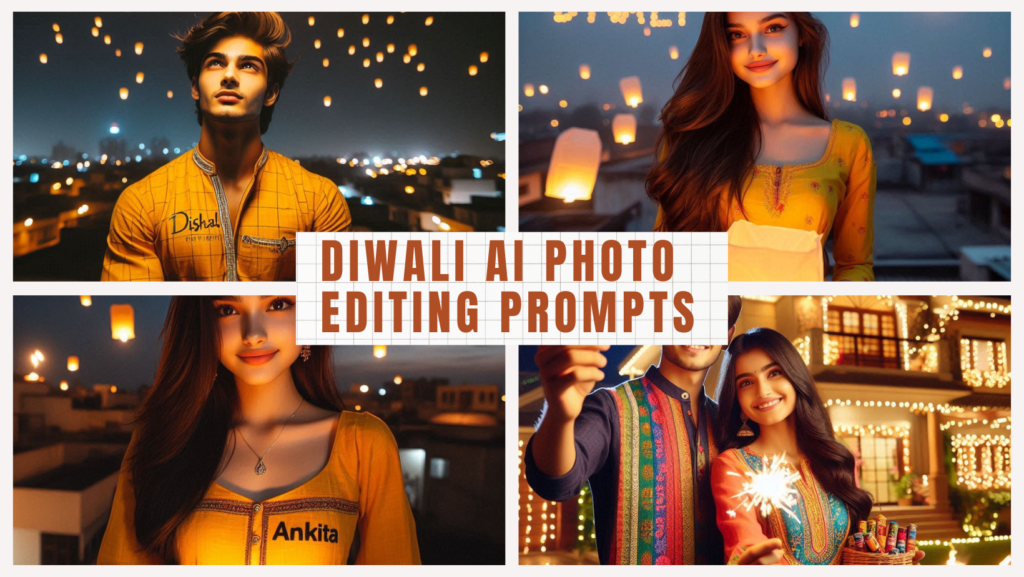
“A real 18-year-old Indian boy is celebrating Diwali on the roof of his house at night and he is wearing a yellow kurta on which “Vishal” is written in clear letters. The boy is holding a sky lantern in his hand along with the text “happy Diwali” written in the sky, there are also sky lanterns. Diwali festival is being celebrated all around. stylish hair, good looks, 16K ultra quality image.”
2. Prompt 2
“A real 18 year old Indian couple is celebrating Diwali with spark in hand in front of their beautiful house at night. Their house is decorated with colorful lights. Both are wearing colorful kurtas. The boy’s kurta has “Rohit” written on it and the girl’s kurta has “Neha” written on it. Both are smiling. There are also Diwali rockets and crackers in the sky with Happy Diwali text. Stylish hair, background, 16K ultra high quality image“
3. Prompt 3
“A real 18-year-old Indian cute girl is celebrating Diwali on the roof of her house at night and she is wearing a yellow kurti on which “Ankita” is written in clear letters. The girl is holding a sky lantern in her hands along with the text “happy Diwali” written in the sky, there are also sky lanterns. Diwali festival is being celebrated all around. stylish hairs, good looks, 16K ultra quality image“
4. Prompt 4
“A couple celebrating Diwali indoors, surrounded by warm lights and festive decorations. The woman is dressed in a traditional red kurti, creating a beautiful rangoli on the floor, while the man kneels beside her in ethical attire, wearing a bright Red kurta with ‘Rahul’ written on it. Oil lamps are lit around the colorful rangoli, enhancing the cozy, joyful atmosphere of the festival. The room is softly illuminated by string lights and glowing lamps, creating a festive vibe“
5. Prompt 5
“A real 18-year-old Indian boy is celebrating Diwali at night with a diya in his hand in front of his beautiful house. His house is decorated with colorful lights. The boy is wearing a yellow kurta on which the name “Sid” is written in clear letters. There are sky lanterns along with the text Happy Diwali in the sky. stylish hair, good looks, 16K ultra quality image“
How to Use AI for Diwali Photo Editing
- Choose Your AI Platform: Popular platforms like Bing Image Creator, DALL·E, and MidJourney allow users to generate images from text prompts. Each platform has unique features, so explore them based on your needs.
- Generate Prompts: The key to great AI images is the quality of your prompts. Be specific with your descriptions, including details like colors, backgrounds, and facial expressions to get the most accurate results.
- Editing Your Images: After generating an image, you can further edit it using traditional photo editing software like Photoshop or Lightroom. Enhance the lighting, add effects, or tweak the details to make your image stand out.
- Sharing Your Creations: Once your images are ready, share them on social media, create personalized Diwali greetings, or even use them for commercial projects.
How to Create the Best Diwali AI Images
- Be Descriptive in Your Prompts: The more detail you provide, the more accurate your image will be. Include details about clothing, background settings, and even emotions for lifelike results.
- Experiment with Styles: Try different artistic styles—traditional, modern, abstract—to see what works best for your vision.
- Use Layers for Depth: If your platform allows, create multiple layers for a more realistic image. For example, you can separate the background from the main subjects for a sharper, more dynamic look.
Conclusion
Diwali is a time to celebrate light, love, and happiness, and AI photo editing allows you to capture that essence with ease. By using these prompts and tools, you can create stunning images that not only reflect the festive spirit but also stand out on social media and beyond.
FAQs
1. Can I use AI-generated images for commercial purposes?
Yes, many platforms allow commercial use, but check each platform’s terms and conditions.
2. Which AI platform is best for beginners?
Bing Image Creator is a user-friendly option for those new to AI photo editing.
3. How can I enhance AI-generated images?
Use photo editing software like Photoshop to enhance lighting, colors, and details in your images.
4. Are AI tools free to use?
Some AI tools offer free versions, but premium features may require payment.
5. Can I generate videos using AI prompts?
Yes, some advanced platforms allow video generation from prompts, though this feature is more complex.